Your desk, from anywhere.
Reach every file on your home or work computer from any browser — encrypted end to end and set up in minutes. Nothing leaves your PC unless you ask: no cloud upload, no VPN.
- End-to-end encrypted
- We never see your files
- Windows, macOS & Linux
- 7 interface languages
- 0
- Files in our cloud
- 40+
- Preview formats (Personal and up)
- 1–10
- Computers per account, by plan
Everything you need for remote work
Security, speed and real control — without handing your files to the cloud.
End-to-end encryption
Every file is encrypted on your device with AES-256-GCM before it leaves, with a key that comes from your password. Our server stores and relays only ciphertext — the contents of your files never reach us.
A direct, live connection
Folders open as soon as you click — nothing to sync and no cloud copy to wait for. Files come straight from your computer, so big ones move at the speed of its internet connection.
Lightweight background app
A tiny agent runs quietly on Windows, Linux or macOS. Install it once, sign in, and your computer is ready to reach from anywhere.
Preview without downloadingPersonal and up
Open images, video, audio, PDFs and source code right in the browser — over 40 file types, nothing to download first.
All your devices, one account
Connect your computers and switch between them in one click — 1 on Free, 3 on Personal, 10 on Pro, all in a single dashboard.
Secure share linksPro and up
Send anyone a private download link. The decryption key stays in the link, never on our servers — and you can revoke it whenever you want.
Full activity log
See every connection and transfer — who, what and when — in one clear audit view.
Works in your language
The interface is fully translated into 7 languages: English, Russian, Ukrainian, French, Simplified and Traditional Chinese, and Japanese.
Mobile appSoon
Reach your files on the go. A native Android app is on the way — and the web app already works in mobile browsers today.
Free includes one computer with browsing, downloads and uploads. File preview comes with Personal, share links with Pro.
Your personal AI — locally, privately
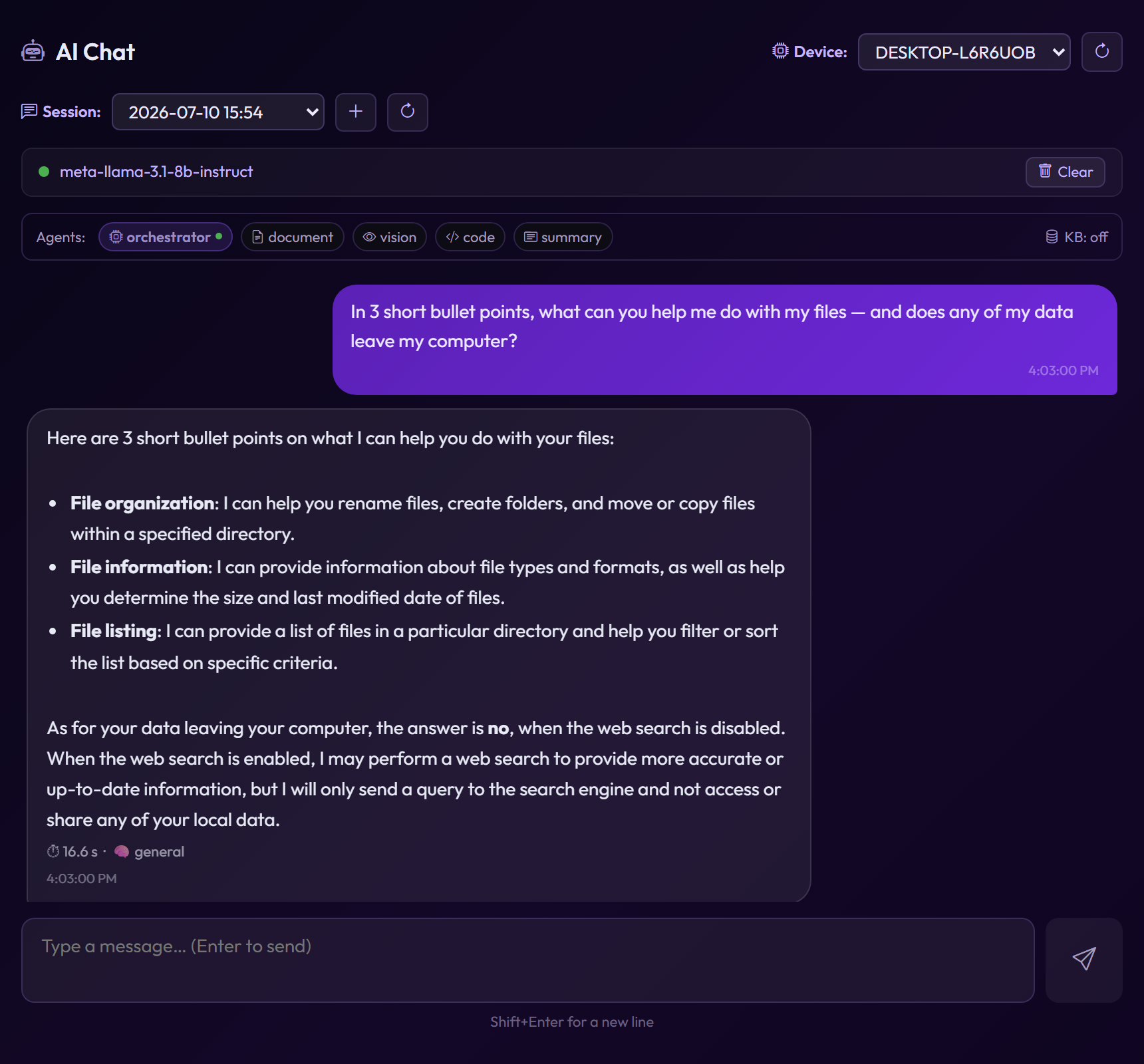
Your personal AI assistant works with your documents locally, without sending your data to the cloud. Use any model from HuggingFace or Ollama.
The right model for each task
Ask anything — the assistant hands the question to the model best suited for it: one for code, one for images, one for your documents.
Answers from your own documents
Choose the folders it may read, and it answers from what's in them. Optional web search adds fresh information, and it remembers facts about you when you say 'remember that…'. Your folders are re-read on a schedule to stay current.
Local by default
The models run on your own computer through the Filemote app (Windows, Linux or macOS). Nothing leaves the machine unless you approve it — a web search, for example. Once a model is downloaded, it works without internet.
Models from HuggingFace and Ollama
Pick a model from HuggingFace or Ollama right in the app — download, switch or delete it in a click, no command line. Runs on your processor or graphics card (NVIDIA, AMD, Intel, Apple Silicon).
Manage AI from anywhere
Start or stop the AI, download and switch models, and configure the knowledge base directly from the website — no desktop app needed.
AI that works with your files
Beyond answering questions, the assistant can create, rename, move and delete files in the folders you allow — always with your confirmation. Turn it on when you want hands-free file management.
Three steps to your first connection
Create an account
Sign up on the website in seconds — free, no credit card required.
Run the agent
Download and run the agent on your computer (Windows, Linux or macOS). Paste the one-time pairing code from the web app — your password is never entered on the device.
Manage files
Add your common folders in one click, then open the web interface. Your computer appears in the device list — select it and manage files from anywhere.
Your computer needs to be switched on and connected to the internet while you reach its files.
Activate in about five minutes
No passwords to copy around, no config files. Link a device, add your folders, and you're live.
Password-free linking
Link a new device with a one-time pairing code shown in the web app — your account password is never typed on the agent.
Common folders in one click
Add your usual directories — Desktop, Documents, Downloads — with a single button instead of typing paths.
Guided setup wizard
A step-by-step wizard walks you through connecting the agent and shows the live connection status until you're ready.
How your files stay private
Your files travel straight from your computer to your browser, encrypted end to end. Our server stores and relays only ciphertext — the contents of your files never reach us.
- Photos 2026
- thesis-final-v3.docx
- lease-agreement.pdf
- budget-2026.xlsx
- u8Jq2+Kf0Zr9mB/xw41cQe==
- 9fA3/QmZ7Rk2bX0yTe8vNw6h
- Lw5Ee1+o4CjR0aK9sV3mPz2Q
- Ty6Gh0Nq8Xb1zM4uWc7Fd5Ys
- Photos 2026
- thesis-final-v3.docx
- lease-agreement.pdf
- budget-2026.xlsx
Frequently asked questions
Is it really secure?
Yes. Files are encrypted on your device with AES-256-GCM before they're sent, using a key derived from your password. Our server stores and relays only ciphertext — the contents of your files never reach us.
Do I need a VPN or port forwarding?
No. The agent makes an outbound connection to the server, so there's nothing to open on your router or firewall.
Which systems does the agent run on?
Windows, Linux and macOS (both Intel and Apple Silicon). Install it once and it runs quietly in the background.
Are my files uploaded to the cloud?
No. Your files stay on your own computer and are streamed encrypted, on demand, only when you open them — nothing is stored on our servers.
Do I type my password on every device?
No. You link each device with a one-time pairing code from the web app, so your password is never typed on the agent.
Is there a mobile app?
A native Android app is coming soon. In the meantime the web app already works in mobile browsers.
Does my computer have to be on?
Yes. Files come straight from your computer, so it must be switched on and online. If it sleeps or loses its connection, its files are available again as soon as it's back online. The same goes for share links: recipients download from your computer, so the speed depends on its internet connection.
Be first to try Filemote
Leave your email and tell us what you need — we'll write the day it opens.